FablePilot

Image to Story Generator

Upload a photo, drawing, or painting and get a complete story inspired by it. Add a note to steer the plot, choose a length, and keep every story in My Library.

Upload a picture to start.0/800
Length
Auto follows your note, or English without one.
Polishes word choice and sentence rhythm for more natural prose. 1 credit / 200 words

How to turn a picture into a story

FablePilot writes a complete story from one uploaded picture and an optional note, in about half a minute.

  1. 01

    Upload a picture

    A photo, drawing, painting, or screenshot. It is scaled down in your browser before upload.

  2. 02

    Add a note if you like

    Name a genre, a character, or a twist, such as "a cozy mystery" or "the cat is the hero."

  3. 03

    Read and keep your story

    The finished story is saved to My Library, where you can rewrite it or continue it as a Book.

One picture, two stories

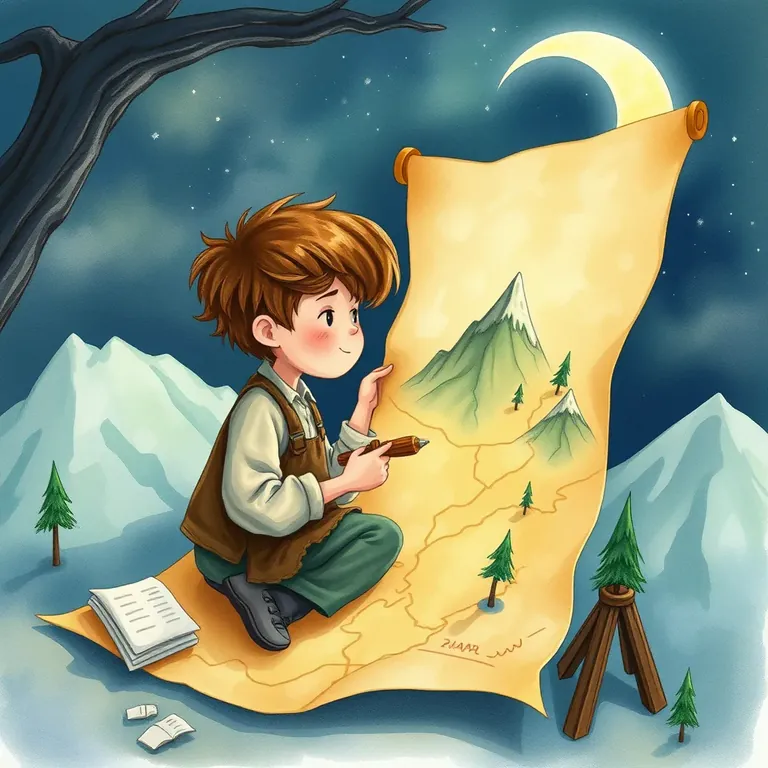
Both stories below were written from this same picture, an illustration FablePilot made. The first had no note; the second had one. These are unedited openings.

Watercolor illustration of a young mapmaker on a moonlit hillside beside a long scroll map of mountains.
The uploaded picture. Length: Short.

No note

The Map the Moon Remembered

In the quiet hill town of Brackenford, Rowan Mils loved two things more than anything: stories and maps. He slept with a notebook tucked under his pillow, scribbling routes he imagined and places he wanted to see. One evening, after the baker had closed up and the last lanterns along the street blinked out, Rowan sat at the window with his candle and tried to copy the star patterns from the sky. That was when he noticed the old oak outside his bedroom—its branches bent like a thoughtful arm—shivering as if something had brushed through the leaves.

Note: "A cozy mystery: something has been stealing the stars from her maps."

Livia and the Thief of Stars

In the little mountain town of Brindlewick, where the houses leaned close together as if they were sharing secrets, Livia Hart ran a map shop called Hart & Hearth. She liked her nights the way she liked her ink: steady, warm, and reliable. Yet three evenings in a row, her customers returned with the same complaint—her maps didn’t match the sky anymore. The creases were fine, the parchment was true, but the star-markings along the trails were wrong. “You mapped my way by Polaris,” one man said, holding up his receipt as if it could prove her honesty. “But last night it was gone.”

What the AI reads from your picture

An image to story generator works from what is visible, then invents the rest.

  • People and creatures

    Who is in the picture, what they are doing, and how they seem to feel become the cast.

  • Setting

    A room, a street, a mountain, or a beach becomes the world the story happens in.

  • Objects

    A map, a letter, a toy, or a bicycle often becomes the thing the plot turns on.

  • Light and mood

    Moonlight, rain, or a bright afternoon sets the tone, from cozy to eerie.

  • What the picture can't show

    Names, history, and what happens next are invented, so the story goes beyond the frame.

Image to Story goes from a picture to words. The story generator with pictures goes the other way: it writes a story from an idea, then draws one illustration for it.

Ways to use a picture to story generator

Any picture with a subject or a place can start a story, from a family photo to a child's drawing.

Picture writing prompts in class

Teachers use a painting or photo as a shared prompt, then compare the AI story with the ones students write. It works well for teaching story structure: beginning, problem, and ending.

Try the note: Write it for 9-year-olds and end with a question for the reader.

Bedtime stories from family photos

Upload a photo from a trip or a birthday and the people in it become characters in a gentle story. Nothing is drawn or changed in the photo, and the picture is not kept.

Try the note: A calm bedtime story where the kids find a secret door at grandma's house.

A starting point for writers

Stuck on a scene? A street photo or a piece of concept art gives the model a setting and a mood to build on. Keep what works, then rewrite it or continue it as a Book.

Try the note: A noir short story told by the person in the red coat.

Stories about pets and drawings

Turn a picture of your dog, cat, or a child's crayon drawing into its own little adventure, with a name and a personality.

Try the note: The cat is a retired spy who still checks the windows every night.

No picture yet? Start from words with the AI story generator.

FAQ

FablePilot's image to story generator turns one photo or drawing into a complete story you can keep.

An image to story generator is an AI tool that looks at a picture and writes a story inspired by it. FablePilot reads the people, setting, objects, and mood in your photo or drawing, then invents the names, history, and events the picture cannot show, and writes a complete story with a beginning, middle, and end.
Yes. After a Google sign-in you get 10 free runs a day, shared with the other writing tools. Each story from a picture uses one.
No. Your picture is scaled down and re-encoded in your browser, which removes its photo metadata such as location, then used only to write and safety-check this one story. It is not saved. My Library keeps the story and your note.
Pictures with a clear subject or place: people, animals, a room, a street, a landscape, or a drawing. JPEG, PNG, and WebP all work. Busy collages or text-only screenshots give the story less to build on.
Yes, they become fictional characters. The story does not try to identify anyone, and it does not alter or generate images of them. Sexual content and pictures that sexualize anyone are blocked.
Choose Short (500-800 words), Medium (1,000-1,600 words), or Long (2,000-3,000 words). Stories can be written in 36 languages; Auto follows the language of your note.
No. Image to Story writes text only, because your picture already sets the scene. If you want a new illustration, use the story generator with pictures, which writes a story from an idea and draws a matching image.